

![图片[1]-【AI桌面硬件大赏】桌面空气质量监测仪 - 盘古CG网](https://oscimg.oschina.net/AiCreationCover/up-a52bf01dc9c2daf82fda9d55892d79b1.png!/format/webp)
夏天来了,你是不是经常感到困倦?你知道为什么夏天更容易犯困吗我们长时间待在封闭的室内环境中,过量的二氧化碳也会让人感到困倦。
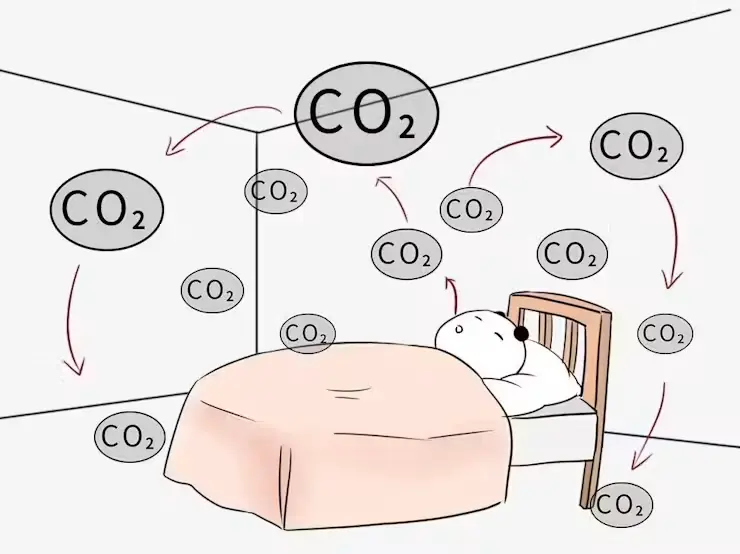
拥挤的办公室里二氧化碳浓度过高会导致烦躁和心悸。此外,如果一夜之间封闭的卧室里二氧化碳浓度过高,人们第二天早上会感到呼吸急促和焦虑。
多少ppm浓度会对人体造成伤害?根据研究:
-
当室内二氧化碳浓度低于700ppm 时,属于清洁空气,人们会感到非常舒适。
-
当二氧化碳浓度在700ppm 到 1000ppm 之间时,这仍然属于正常范围,属于普通空气,但一些敏感的人会感到不适。
-
当二氧化碳浓度超过 1000ppm ,但空气处于 1500ppm 的临界阶段时,人们会感到精神萎靡,开始注意力不集中,并出现心悸。
-
当二氧化碳浓度达到1500ppm 至 2000ppm时,空气就被认为是轻度污染,会引起头痛、头晕和呼吸困难。
-
如果浓度超过2000ppm ,就被认为是严重污染。我们甚至不想继续工作,思维能力也显著下降。
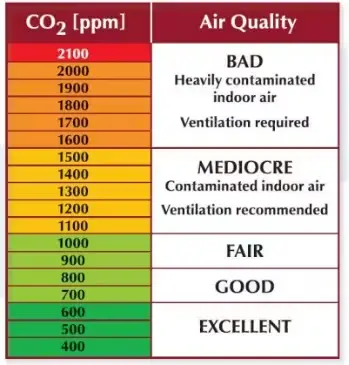
因此,了解空气中二氧化碳的浓度对我们的工作和生活都非常有用。本项目可检测二氧化碳、湿度和温度,并将这些数据显示在 Wio 终端上,让您一目了然地了解每个场景的空气质量,并提醒您开窗通风。
硬件设置
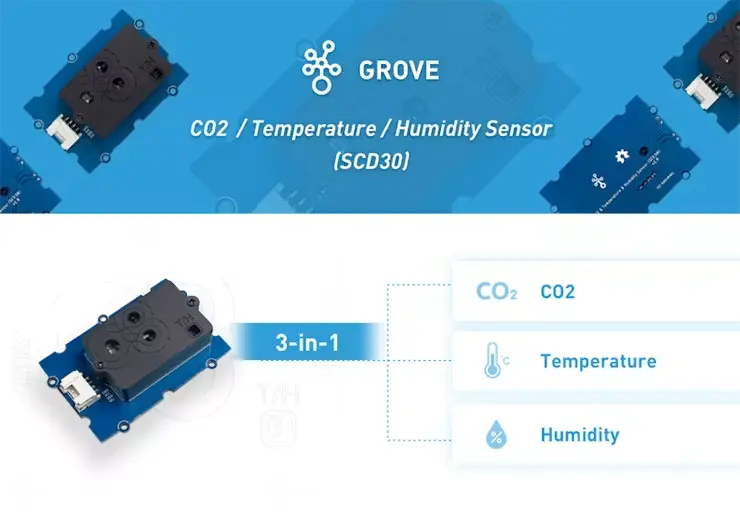
我们将使用Grove CO2 传感器 (SCD30)进行 CO2 浓度测量。Grove SCD30 是一款三合一 Arduino 传感器,可测量 CO2、温度和湿度。它基于 Sensirion SCD30,是一款高精度、宽测量范围的非色散红外 (NDIR)二氧化碳传感器。如果您正在为您的 Arduino 气象站或其他环境项目寻找一款多功能传感器,它将是您的理想之选。
Wio Terminal兼容 Arduino 和 Micropython,采用 ATSAMD51 微控制器,并由 Realtek RTL8720DN 芯片支持无线连接。其 CPU 运行频率为 120MHz(最高可达 200MHz)。Realtek RTL8720DN 芯片同时支持蓝牙和 Wi-Fi,为物联网项目提供坚实的基础。Wio Terminal 高度集成,配备 2.4 英寸 LCD 显示屏、板载 IMU(LIS3DHTR)、麦克风、蜂鸣器、microSD 卡槽、光传感器和红外发射器(940nm)。
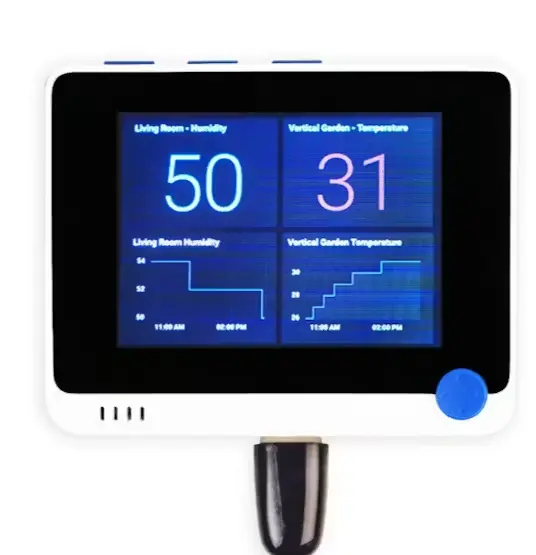
设计精良的外壳内置磁铁和两个安装孔,让您轻松搭建物联网项目。
开发环境
该应用程序使用 Arduino IDE 进行开发、编译和烧录。请下载最新版本的 Arduino IDE,并按照Seeed 的 wiki进行安装。要安装 Wio Terminal 开发板库,请打开 Arduino IDE,点击“文件”>“首选项” ,然后将以下 URL 复制到“附加开发板管理器 URL”中:https://files.seeedstudio.com/arduino/package_seeeduino_boards_index.json
点击“工具”>“开发板”>“开发板管理器” ,搜索“Wio Terminal” ,然后点击“安装”。您需要使用“工具”>“开发板”菜单选择开发板和端口。
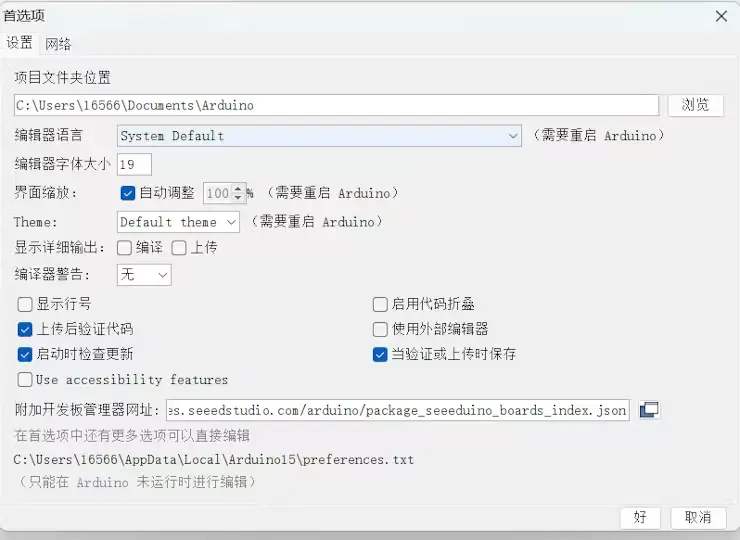
安装 Grove CO2 传感器 (SCD30) 的库:
-
步骤 1.从 Github下载Seeed SCD30 库。
-
步骤 2.请参阅如何为 Arduino 安装库。
-
步骤 3.重启 Arduino IDE。打开示例,直接在 Arduino IDE 中通过以下路径打开:文件 → 示例 → Grove_scd30_co2_sensor → SCD30_Example 。
项目步骤说明
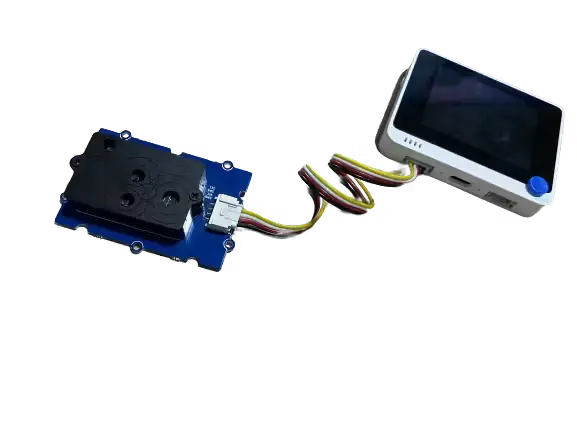
步骤 1:连接 Wio 终端和传感器。
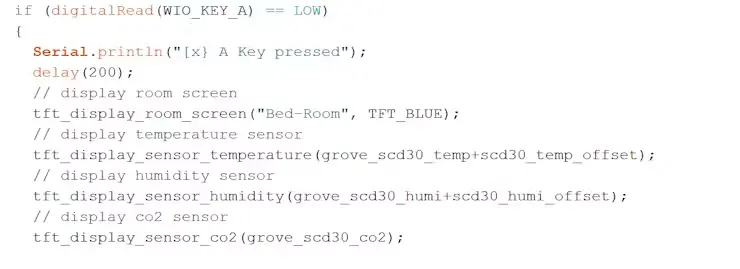
步骤 2:界面设计、显示文本和图片:按“A”键显示温度、湿度和二氧化碳值
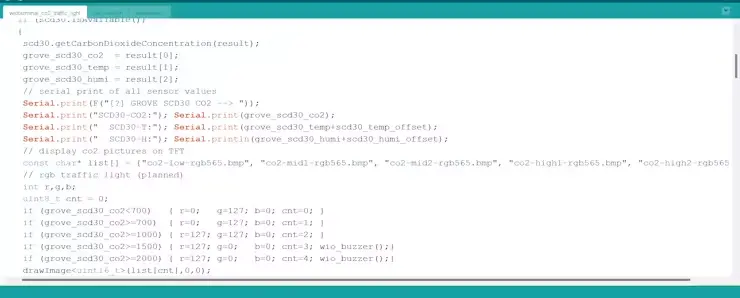
步骤 3:达到警告值时,蜂鸣器会发出声音。
-
当二氧化碳浓度低于700时,为正常水平,显示图片0
-
700<=CO2<1000,感觉有点不好,显示图片1
-
二氧化碳浓度在 1000 至 1500 之间,会引起轻微不适,显示图片 2。
-
当二氧化碳浓度为1500<=CO2<2000时,空气轻度污染,显示图片3,同时蜂鸣器发出警报。
-
二氧化碳浓度≥2000,严重污染,显示屏显示图片4,蜂鸣器同时报警。
#include "TFT_eSPI.h"
   TFT_eSPI TFT ;
   #define LCD_BACKLIGHT (72Ul)
   bool tft_backlight = true ;
   #include
   #include "Seeed_FS.h"
   #include "RawImage.h"
   #include "Free_Fonts.h"


   #include "SCD30.h"
   int grove_scd30_co2 = 0 ;
   int grove_scd30_temp = 0 ;
   int grove_scd30_humi = 0 ;
   int scd30_temp_offset = -4 ;
   int scd30_humi_offset = 13 ;


   void sensor_co2 ()
   {
     float result [ 3 ] = {0} ;

     如果( scd30.isAvailable ( ) )
     {
      scd30.getCarbonDioxideConcentration ( result ) ;
      grove_scd30_co2 = result [ 0 ];
      grove_scd30_temp = result [ 1 ];
      grove_scd30_humi = result [ 2 ];
      // 串行打印所有传感器值
      Serial.print ( F ( " [ ?] GROVE SCD30 CO2 --> " )) ;
      Serial.print ( " SCD30 -CO2: " ) ; Serial.print ( grove_scd30_co2 ) ;
      Serial.print ( " SCD30 -T: " ) ; Serial.print ( grove_scd30_temp + scd30_temp_offset ) ;
      Serial.print ( " SCD30 -H: " ) ; Serial.println ( grove_scd30_humi + scd30_humi_offset ) ;
      // 在TFT屏幕上显示二氧化碳图片
      const char* list[] = {"co2-low-rgb565.bmp", "co2-mid1-rgb565.bmp", "co2-mid2-rgb565.bmp", "co2-high1-rgb565.bmp", "co2-high2-rgb565.bmp"};
      // rgb traffic light (planned)
      int r,g,b;
      uint8_t cnt = 0;
      if (grove_scd30_co2=700)  { r=0;   g=127; b=0; cnt=1; }
      if (grove_scd30_co2>=1000) { r=127; g=127; b=0; cnt=2; }
      if (grove_scd30_co2>=1500) { r=127; g=0;   b=0; cnt=3; wio_buzzer();}
      if (grove_scd30_co2>=2000) { r=127; g=0;   b=0; cnt=4; wio_buzzer();}
      drawImage(list[cnt],0,0);
      tft.setTextColor(TFT_BLACK,TFT_WHITE);
      tft.setFreeFont(FMB18);
      tft.drawNumber(grove_scd30_co2,80,190);
     }
   }

  void wio_buzzer(){
    analogWrite(WIO_BUZZER, 128);
    delay(1000);
    analogWrite(WIO_BUZZER, 0);
    delay(1000);

    }

   // this timer is used to update tft display
   unsigned long previousMillis = 0;
   // send every 10 minutes
   // unsigned long interval = 600000;
   // send every 3 minutes
   // unsigned long interval = 180000;
   // send every 30 seconds
   unsigned long interval = 30000;
   unsigned long counter  = 0;


void tft_display_status_bar(String room_name, long int room_bg)
{
  tft.fillRect(0,0,320,50,room_bg);
  tft.setFreeFont(FMB18);
  tft.setTextColor(TFT_WHITE);
  tft.setCursor((320 - tft.textWidth(room_name)) / 2, 32);
  tft.print(room_name);
}


void tft_display_room_screen(String room_name, long int room_bg)
{
  tft.fillScreen(TFT_WHITE);
  tft.fillRect(0,0,320,50,room_bg);
  tft.setFreeFont(FMB18);
  tft.setTextColor(TFT_WHITE);
  tft.setCursor((320 - tft.textWidth(room_name)) / 2, 32);
  tft.print(room_name);
  // drawing verticle line
  tft.drawFastVLine(150,50,190,TFT_DARKGREEN);
  // drawing horizontal line
  tft.drawFastHLine(0,140,320,TFT_DARKGREEN);
}


void tft_display_sensor_temperature(int temperature)
{
  // setting the temperature
  tft.setTextColor(TFT_BLACK);
  tft.setFreeFont(FMB9);
  tft.drawString("Temperature",15,65);
  tft.setTextColor(TFT_BLACK);
  tft.setFreeFont(FMB18);
  tft.drawNumber(temperature,50,95);
  //tft.drawNumber(21,50,95);
  tft.setFreeFont(FMB12);
  tft.drawString("C",100,95);
}

void tft_display_sensor_humidity(int humidity)
{
  // setting the humidity
  tft.setTextColor(TFT_BLACK);
  tft.setFreeFont(FMB9);
  tft.drawString("Humidity",30,160);
  tft.setTextColor(TFT_BLACK);
  tft.setFreeFont(FMB18);
  tft.drawNumber(humidity,50,190);
  tft.setFreeFont(FMB12);
  tft.drawString("%",100,190);
}


void tft_display_sensor_co2(int co2)
{
  // setting the CO2
  tft.setTextColor(TFT_BLACK);
  tft.setFreeFont(FMB9);
  tft.drawString("CO2",220,160);
  tft.setTextColor(TFT_BLACK);
  tft.setFreeFont(FMB18);
  tft.drawNumber(co2,160,190);
  tft.setFreeFont(FMB12);
  tft.drawString("ppm",250,190);
}


void setup()
{
  Serial.begin(9600);
  delay(3000);
  Serial.println(F(" "));
  Serial.println(F(" "));
  Serial.println(F("Starting..."));
  Serial.println(F("WioTerminal CO2 Traffic Light Version 1.00"));
  Serial.println(F("GROVE SCD30 connected via I2C"));
  Serial.println(F(" "));

  pinMode(WIO_KEY_A, INPUT_PULLUP);
  pinMode(WIO_KEY_B, INPUT_PULLUP);
  pinMode(WIO_KEY_C, INPUT_PULLUP);
  pinMode(WIO_BUZZER, OUTPUT);


  Serial.println(F("[?] SD card initialize.."));
  if ( ! SD.begin ( SDCARD_SS_PIN , SDCARD_SPI ) )
  {
    while ( 1 );
  }

  tft.begin ( ) ;
  tft.setRotation ( 3 ) ;
  Serial.println ( F ( "[?] GROVE SCD30 CO2传感器初始化." ) );
  Wire.begin ( ) ;
  scd30 .初始化();
  延迟(500 );
  sensor_co2 ();
}

void loop ()
{
  如果( digitalRead ( WIO_KEY_A ) == LOW )
  {
    Serial.println ( " [ x} 按下了某个键" ) ;
    延迟(200 );
    // 显示房间屏幕
    tft_display_room_screen ( "卧室" , TFT_BLUE );
    // 显示温度传感器
    tft_display_sensor_temperature ( grove_scd30_temp + scd30_temp_offset );
    // 显示湿度传感器
    tft_display_sensor_humidity ( grove_scd30_humi + scd30_humi_offset );
    // 显示二氧化碳传感器
    tft_display_sensor_co2 ( grove_scd30_co2 );

  }
  否则如果( digitalRead ( WIO_KEY_B ) == LOW )
  {
    Serial.println ( "[x] B键被按下" ) ;
    延迟(200 );
    //读取二氧化碳传感器数据*/
    sensor_co2 ();
  }
  否则如果( digitalRead ( WIO_KEY_C ) == LOW )
  {
    Serial.println ( "[x] C键被按下" ) ;
    tft_backlight = ! tft_backlight ;
     // 关闭液晶背光
    if ( tft_backlight == false ) { digitalWrite ( LCD_BACKLIGHT , LOW ); }
     // 打开液晶背光
    if ( tft_backlight == true ) { digitalWrite ( LCD_BACKLIGHT , HIGH ); }
    延迟(200 );
  }


  如果(毫秒()-先前毫秒>间隔)
  {
    // 正确的计时器
    previousMillis = millis ();
    //读取二氧化碳传感器数据*/
    sensor_co2 ();
  }

}
结论
这个项目还有很多其他可能性。未来,我想利用Wio终端内置的WiFi模块将数据上传到云端,然后在电脑和移动终端上显示数据。数据预警更加智能,远程监控也将使智能家居更加便捷。








暂无评论内容